Many mobile detailers will find their customers on Instagram. You post a before and after and they click your name to see more. That’s when they see your bio link.
If you don’t have a link or it leads them to a page that doesn’t have prices or something they can easily navigate they will not book you. Here are some tips to get that link in your bio and other ways to lead your customers to your page.
Add your link to your bio
This can only be done on your phone. From Instagram’s help page these are the instructions.
- Tap your profile picture on the bottom right hand side of the screen.
- Click edit profile.
- Click links and add external link.
- Paste your link and click done. Then back.
You can add multiple links. If you have more than one, the first link will be your main one and it will expand to show the others. You can change your links and order them by clicking edit profile > links and hit reorder links.
Try to have just 1
As mentioned you can add up to 5 links to your bio. Having too many options may deter someone from tapping the link they want. If they’re looking for an interior detail price they don’t need to see your TikTok, Google reviews or merch store. Make sure your link takes them to your services and prices (or starting price) and they can submit a request.
If you have multiple links have your booking page as the first one and label it “get a quote” or something similar.
Have a descriptive bio
You have limited characters so use them wisely. Tell your customer what you do and where.
- What you do - Mobile Detailing will tell them more than any catch phrase can.
- Where you travel - City or areas you travel to.
- We come to you - “At your home or office”.
- Get a quote below/Link below.
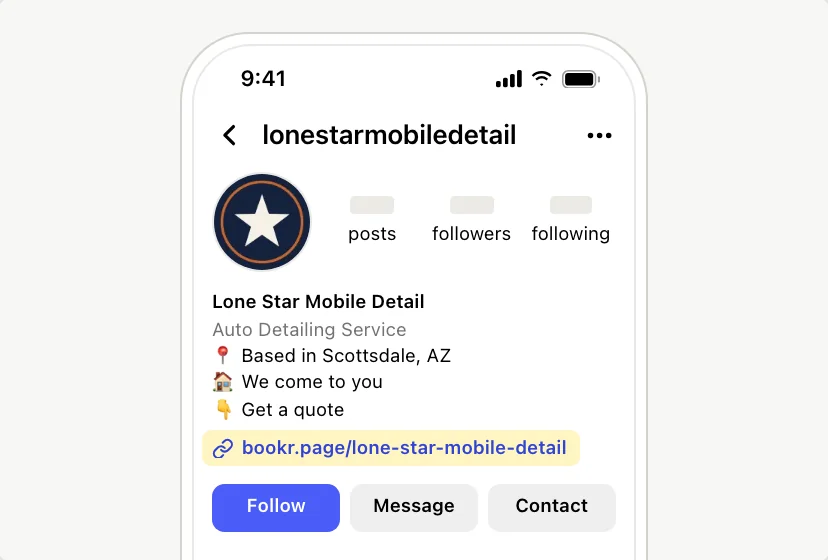
Do not overdo your bio. Tell them what they need to know before they click the link.
Direct your customers to your link
Your links will not be clickable in your caption and comments. So remind your customer to click the link in bio. Here are some ways you can do that.
- Stories - Link sticker on your stories is another great way. You can always plug your link if you have an opening the following day.
- Highlight - Have a highlight with your link and prices.
- DMs - When a customer DMs you asking for prices you can always send them your link. Have a saved response ready.
- Pin a post - Post about what you do and have link in bio to get a quote.
Know how your link will open
When your customer clicks on your link it will most likely open in Instagram’s browser. Which means they may not be signed in to anything. So make sure your link can open without signing into an app or having to download anything.
Always test your link from your profile.
Bookr page in your bio
You can have your Bookr page as your link in bio. You will have a page that goes by bookr.page/yourbusiness. On your page you can display what you offer. Your prices (optional) and they can pick what type of car they have. Tick anything that applies to their car, like pet hair or stains. Then choose a date and time. No app or account needed.
They will submit their request and you will receive an email. If you are in the US you can get a text message too. Just send them your quote link.
Questions
How many links can I have in my bio?
You can have up to 5 links. Your first link will be your default link and the others expand from it.
Can I put my link in my bio from my computer?
No you will need to do this from the iPhone app or Android app.
Why can’t I put my link in my Book now button?
The Book now button will only connect to Instagram’s partner apps.